 Leta
Routing
The Routing tab lays pipe, tube, hose and cable out of ports and through holes, and wire harnesses along the bundles drawn for them. Each route is kept in a route assembly of its own beside the main assembly, and is laid again when the parts it passes through move.
Routes and route assemblies
A route runs from point to point through an assembly, in the stock chosen for it. It goes into a route assembly of its own beside the main assembly, which holds its path; its pieces are made from that path, so a route needs no part files of its own.
- Pipe, Tube, Hose and Cable in the Routes group; Harness, Bundle, Connector and Wire List in the Harness group; Belt beside them
- A route assembly beside the assembly, named Pipe1, Tube1, Harness1 and so on, with as many routes in it as wanted
- The pieces counted in mass and interference, and listed in the tree under their route
- Laid again after the parts it passes through move
- Each route's length in the tree, or in red the reason it cannot be laid
- A route's menu: Edit, Bend Table, Cut List, Suppress, Rename, Add a Route and Delete Route
Ports and holes
A route starts and ends at ports, round edges or faces or coordinate systems that it runs straight out of along their axes. Between them it passes through holes along their axes, through points on parts, and through free points.
- A bore, a pin, a tube's end, a circular edge, a cone or a torus picked anywhere along a route is used as what it is
- A port on a bore or a spigot runs out of its open end, found from the part's material
- Straight: how far it runs straight out of a port before it turns, by default a fitting's length or the bender's clamp
- Flip runs it along the axis the other way
- A hole passed straight through along its axis, as far as the hole is long; Center passes its center only
- Along: where on a round face, from its open end (0) to its far end (1)
- Points on a vertex, on a face where it is clicked, at an edge's middle or at a round edge's center, and free points anywhere
- Next Along: +X to -Z buttons put the next point a typed length on from where the route ends
- A hole too small for the stock is noted, such as a 13.3 mm hose through a 10 mm hole
Editing a route
A route's points are dragged in the window as well as typed, and a press anywhere on its curve puts a new point there and drags it. The curve is drawn red where it bends tighter than its stock allows, and its tightest bend is labeled.
- Edit Route in the Change group, a double-click on the route's row, or Edit on its menu
- The Points list: each point in turn, Insert before one, or take one out
- A free point dragged on the plane through it facing the view; a point on a part moved from where it is
- Tangent holds the curve along a direction through a point, turned by dragging its square handle
- Reach sets how far a held direction carries the curve
- X, Y and Z typed for a free point, or as a point's offset from what it is on
- The Length card gives the length and the tightest bend while dragging, red when too tight
- On pipe and tube, a press on the route makes a corner there
Relax
Relax moves the free points of a hose, cable or bundle to nearby places where it bends no tighter than its stock allows. It says what moved, and the tightest bend before and after.
- On the route strip's Edit card
- Ports, holes and points on parts never move
- No point moved further than twice the stock's least bend from where it was
- For hose, cable and bundles; pipe and tube bend at their dies instead
Pipe, elbows and cut lists
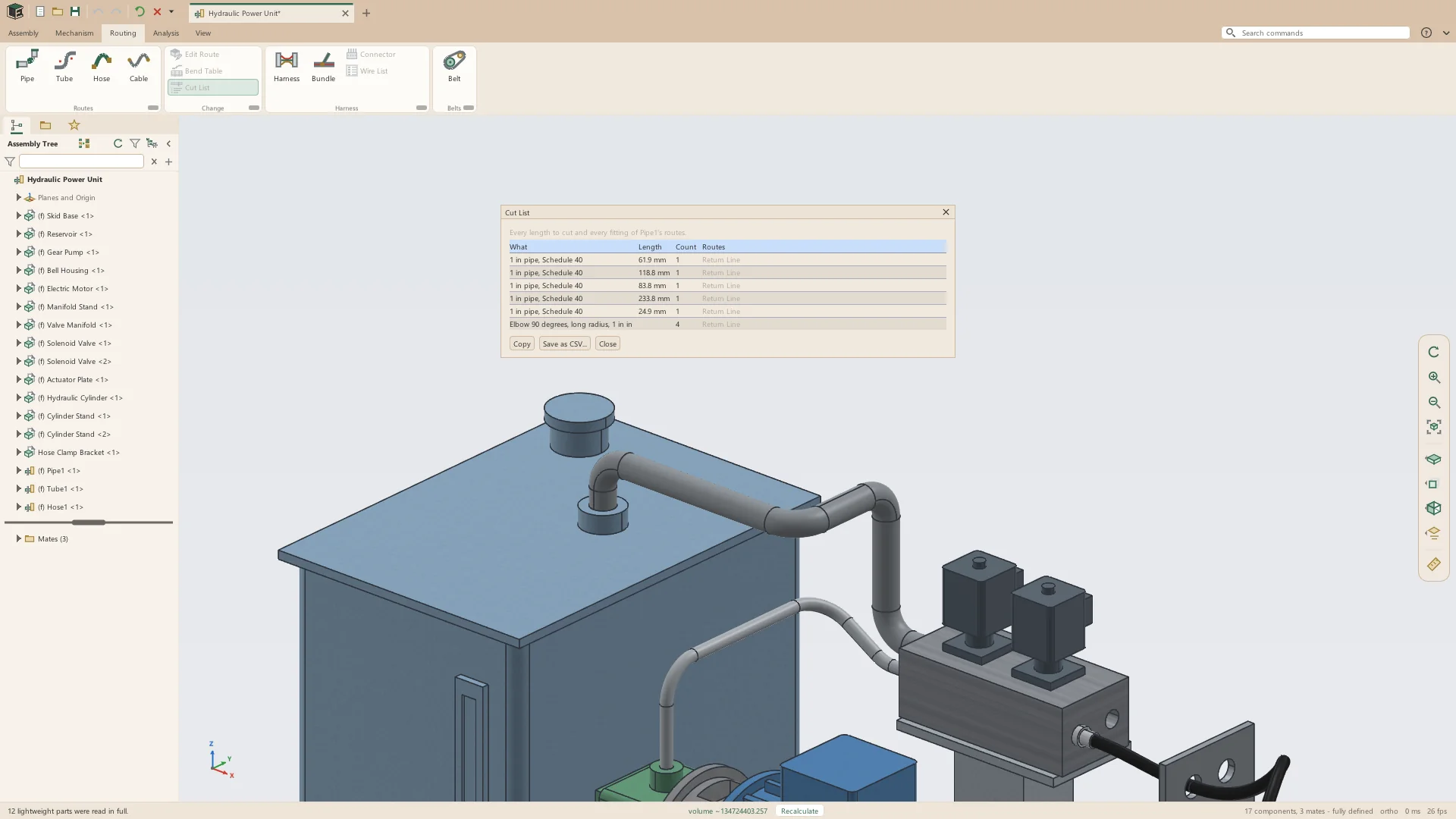
Pipe is laid as straight lengths with a long-radius elbow at each corner. Its cut list counts every length to cut and every elbow.
- ASME B36.10M pipe from 1/8 to 12 in, in Schedules 10, 40 and 80
- ASME B16.9 long-radius elbows
- A corner under 90 degrees gets a cut elbow; one over 90 degrees is refused as needing two elbows
- A run too short for the elbows at its two ends is refused, saying so
- The Length card counts the elbows as the route is laid
- Cut List: every length to cut and every fitting in the route assembly, saved as CSV
Tube and bend tables
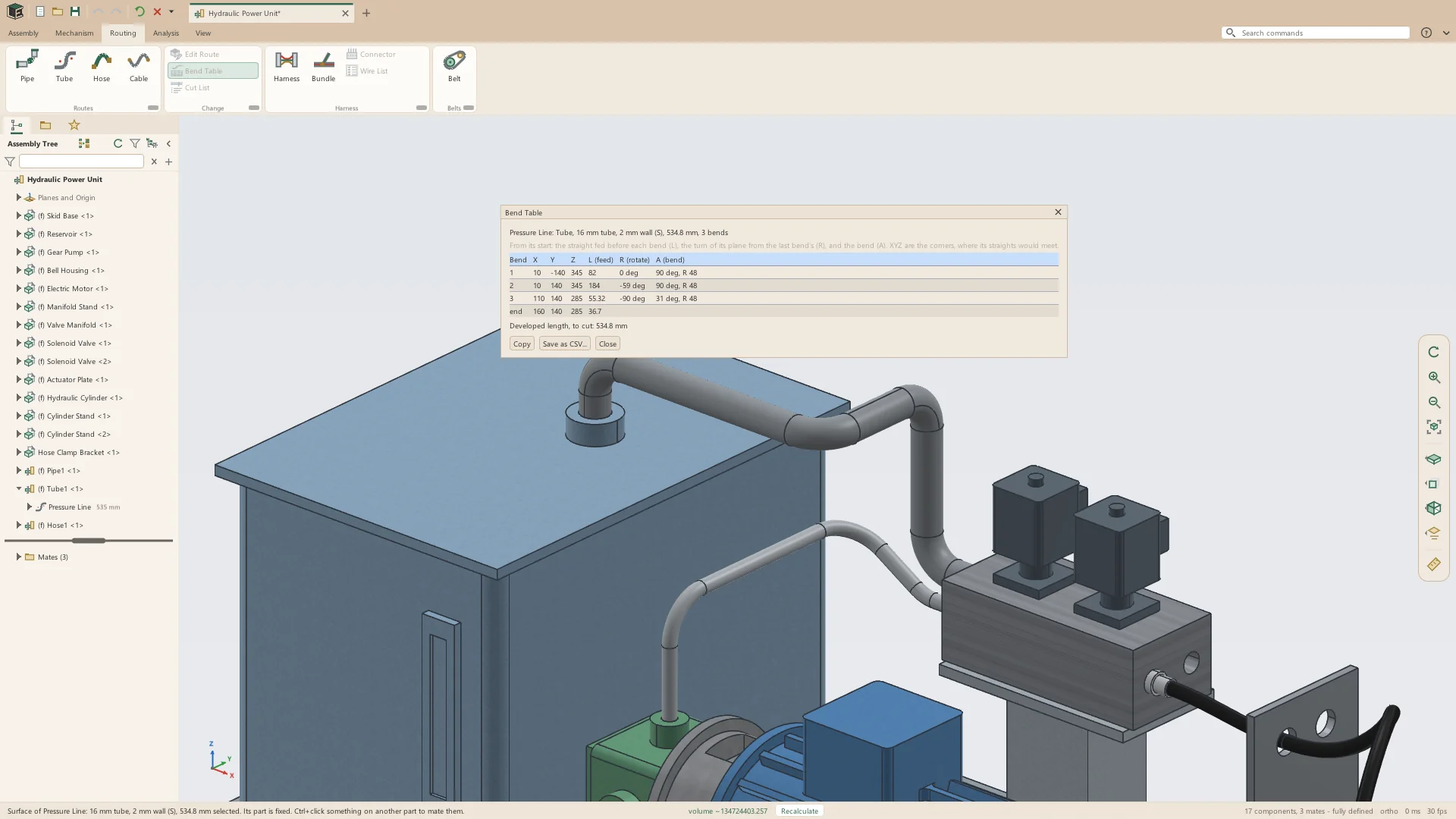
Tube is one piece, bent round its bender's die at each corner. Its bend table gives what the bender is set up from, and its developed length is the length to cut.
- Metric tube in the ISO 8434-1 L and S series, 6 to 42 mm
- Inch tube from 1/8 to 2 in
- 1-3/4 and 2 in exhaust tube
- Each size bent at the radius of a typical bender's die
- Bend Table: each corner's X, Y and Z, and from the start the feed (L), the turn of the bend's plane (R) and the bend (A)
- The developed length, and the bend table saved as CSV
Hose and cable
Hose and cable run on a smooth curve through their points, leaving each port along its axis, and a hose has a fitting on each end. The stock sets the least bend each may take, and a tighter bend is reported rather than refused.
- Two-wire hydraulic hose, SAE 100R2AT, -4 to -32 (1/4 to 2 in)
- -3 and -4 PTFE stainless-braided brake hose
- SAE J30R7 fuel hose, 3/16 to 1/2 in
- Silicone tubing, silicone coolant hose of 16 to 25 mm bore, and clear PVC tubing
- Cable of 2 to 6 conductors, shielded cable, USB cable and a 3 × 14 AWG power cord
- 5 and 6 mm Bowden cable housing
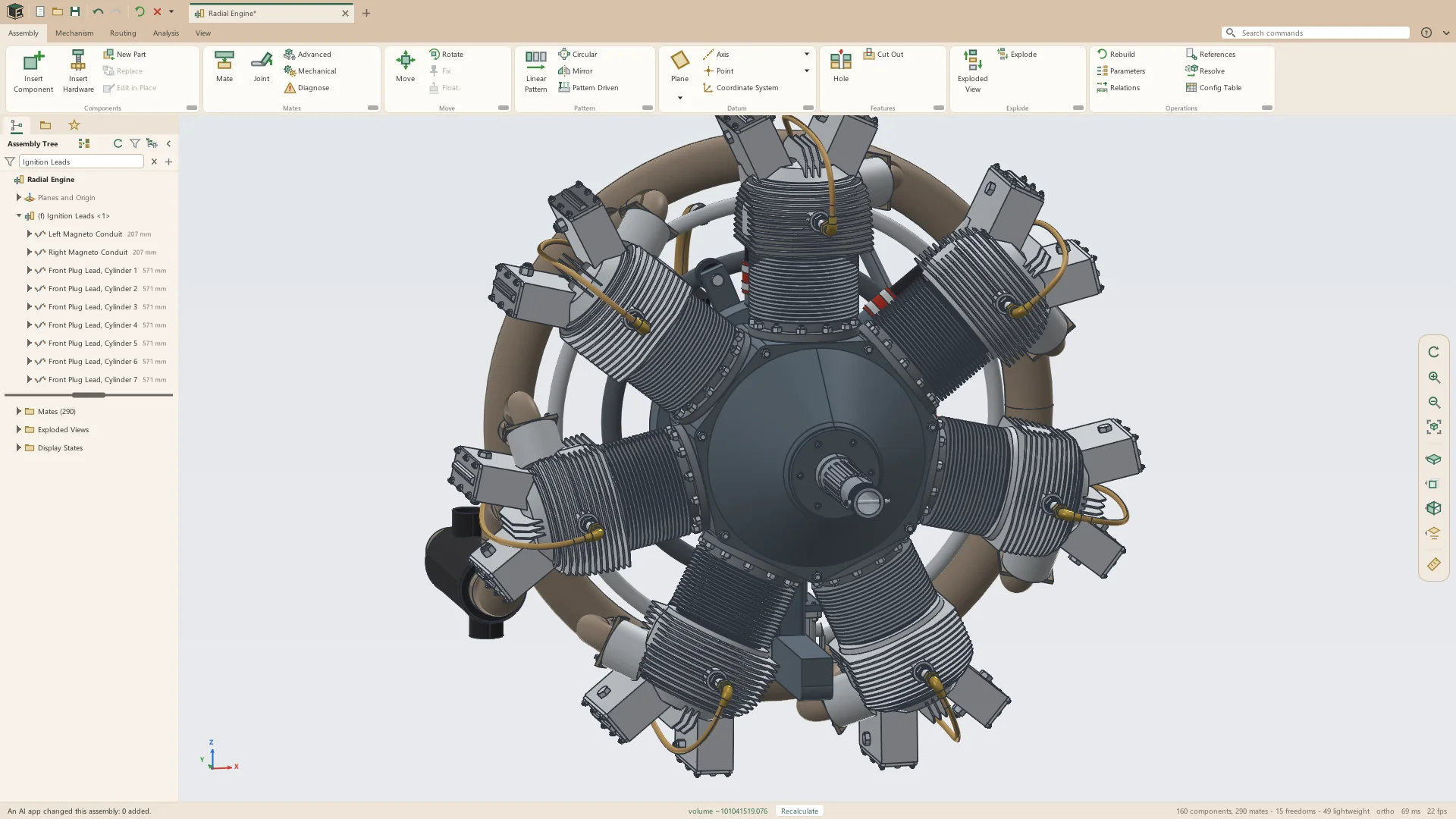
- 7 and 9 mm shielded ignition leads
- 16 and 22 mm braided flexible conduit, and 25 mm corrugated nylon conduit
- A hose between two ports alone laid as gently as its ports allow
Harnesses, connectors and bundles
A harness is a route assembly of its own that holds its connectors, the bundles its wires run along, and its wire list. Each bundle is as thick as the wires routed through it.
- Harness makes the harness and opens its first connector
- A connector is any part, its pins clicked one after another: a vertex, a round edge's center or a datum point
- Designators J1, J2 and so on, and pin names counting on: 1, 2, 3 or A1, A2
- Bundles drawn with the route strip, through points as a cable is
- A breakout: a bundle that starts on another bundle's middle
- Each bundle's diameter from the wires inside it, bending no tighter than three of its diameters
- A connector's pins listed in the tree, red where a pin's reference is lost
Wires and the wire list
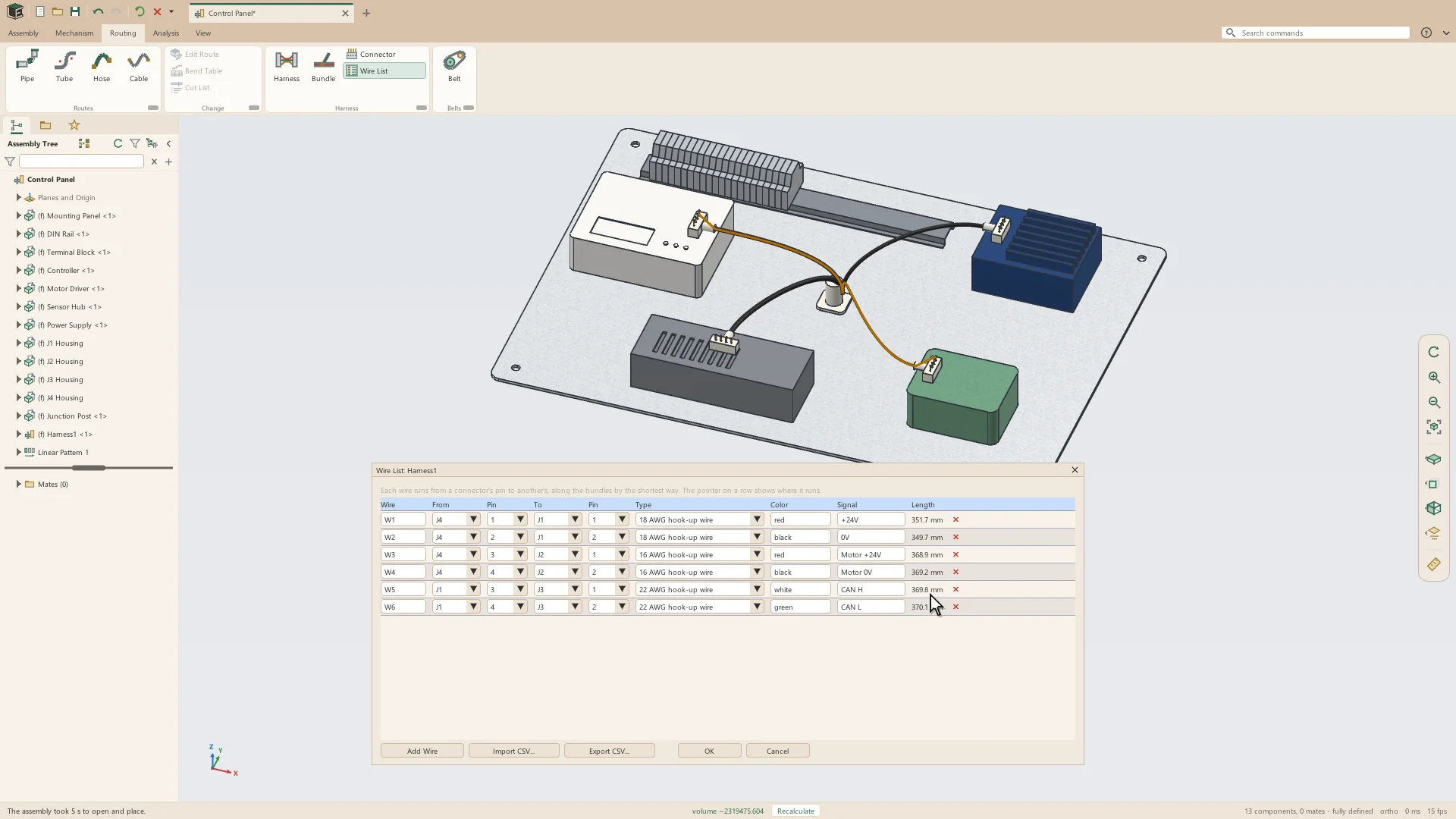
Each wire is routed the shortest way along the bundles drawn, from its pin to the pin at its other end, and its length is worked out. The wire list is typed in the window or read from a spreadsheet.
- Wire List columns: Wire, From, From Pin, To, To Pin, Type, Color, Signal and Length
- Read from CSV, its columns found by their headings, and written back to CSV
- The pointer on a row draws where that wire runs
- Hook-up wire from 30 to 4 AWG, and thin-wall wire from 0.35 to 16 mm²
- A wire leaves its connector at a bundle end on the connector's part, or at the bundle point nearest its pins
- A wire no bundle reaches names the connector that needs one
- Problems listed: a pin used by two wires, a pin its connector has not got, a wire with no type or no ends
See it on your own parts
Beta builds go out by email. Say what you design and what you use now.